- |
how to buy bitcoin online
How to Buy Bitcoin Online With INTERAC e-Transfer® (Step-by-Step Guide)
How to use a Localcoin ATM
This guide will walk you through how to use a Localcoin ATM to buy crypto.
Quick Summary
What this guide covers: How to buy Bitcoin online in Canada with Localcoin using INTERAC e-Transfer, step by step.
Time required: A few minutes to set up; crypto usually arrives within minutes (up to 30).
What you need: A crypto wallet address, a mobile phone for SMS verification, your full name and email, and access to your online or mobile banking to send the e-Transfer.
ID required? Yes. You’ll need to verify your identity before completing your first transaction.
Where it's available: Localcoin's online INTERAC e-Transfer purchase is available across Canada.
Quick Answer: How Do I Buy Bitcoin Online in Canada?
The fastest way to buy Bitcoin online in Canada is with Localcoin using INTERAC e-Transfer. Verify your phone number, full name, and email; enter your Bitcoin wallet address; choose your amount; then send an INTERAC e-Transfer from your banking app. Your Bitcoin is sent directly to your wallet within minutes — no exchange account required.
- Go to the Localcoin buy-online page and verify your phone, full name, and email.
- Enter the one-time code sent to your phone.
- Paste your Bitcoin wallet address.
- Choose your amount and send an INTERAC e-Transfer.
Your Bitcoin arrives in your wallet in minutes.
What Is Buying Bitcoin Online With INTERAC e-Transfer?
Buying Bitcoin online with INTERAC e-Transfer lets you purchase crypto from home using the same secure transfer method Canadians already use for everyday banking — no cryptocurrency exchange account and no lengthy sign-up. You choose an amount, send an INTERAC e-Transfer from your bank, and your crypto is sent straight to your own wallet.
Because your crypto goes directly to a wallet address you control, you hold your own keys. Localcoin does not store your crypto.
What You Need Before You Start
Before you begin, have these ready:
Don't Have a Bitcoin Wallet Yet?
You'll need a wallet to receive your Bitcoin. Here are two beginner-friendly options:
Tip: Open your wallet, find your Bitcoin receive address, and keep it handy. You'll copy this address during checkout — always copy and paste it, never type it by hand.
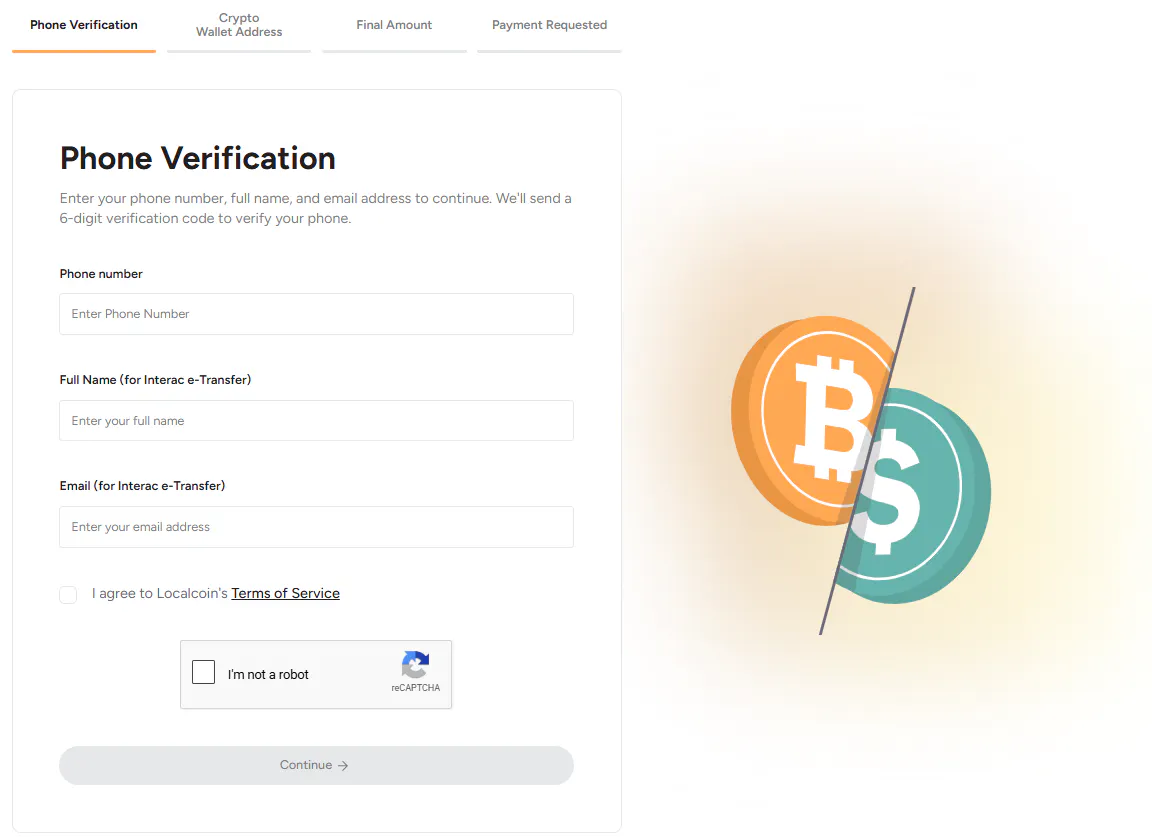
Step 1: Verify Your Phone, Name & Email
Go to the INTERAC e-Transfer Online Buy page and enter your mobile phone number, your full name (as it appears for your INTERAC e-Transfer), and your email address. You'll receive a one-time verification code by SMS — enter it on screen to continue.
Why this is needed: This step confirms your contact details and helps prevent fraud. There's no account to create and no ID required.
Step 2: Enter Your Bitcoin Address
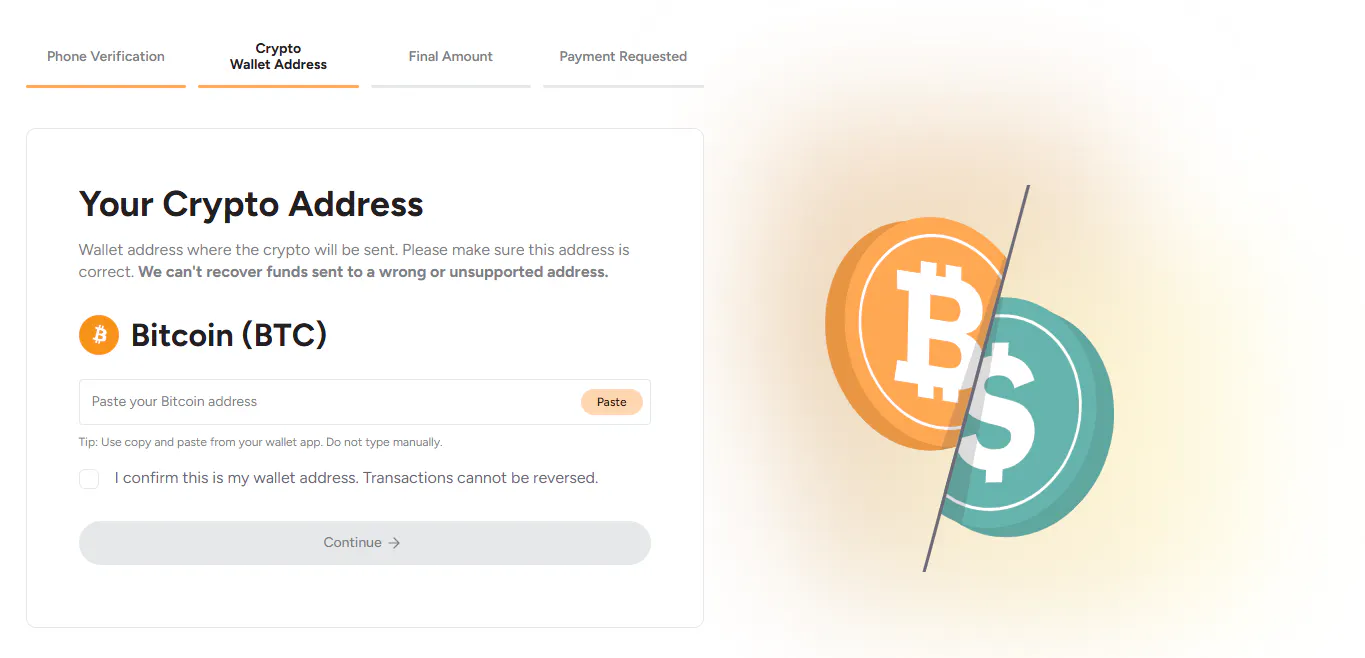
Next, paste your Bitcoin receive address into the Your Crypto Address field. Use copy and paste from your wallet app — never type a wallet address by hand, because a single wrong character can send funds to the wrong place. Confirm the address is correct, check the box acknowledging that transactions can't be reversed, and continue.
Important: Once your payment request is created, your wallet address can't be changed. Double-check it now.
Step 3: Scan Your Bitcoin Wallet's QR Code
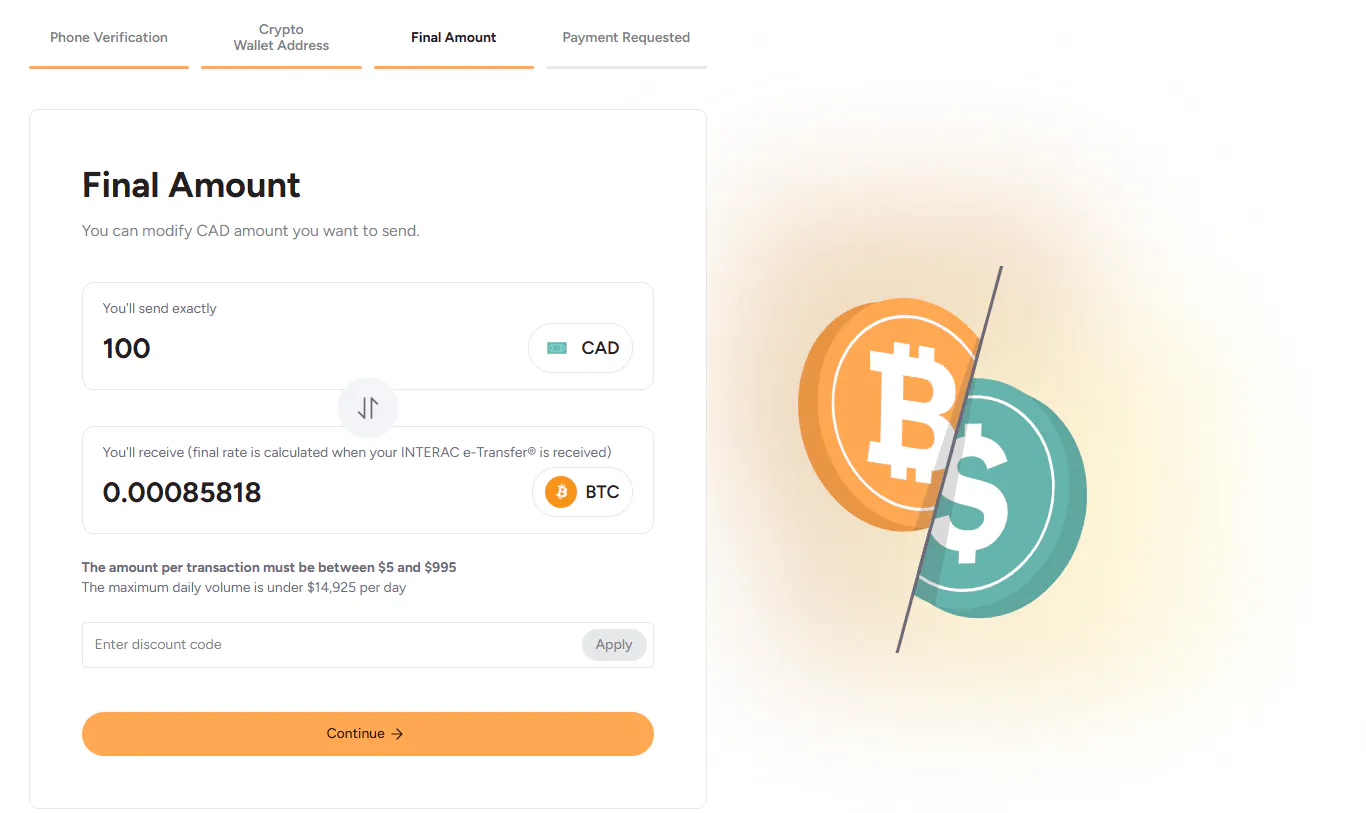
Enter the amount in CAD you'd like to send. The screen shows the estimated Bitcoin you'll receive. The final rate is calculated the moment your INTERAC e-Transfer is received, so the amount may shift slightly with the market.
Limits: Each transaction must be between $5 and $995 CAD, and total daily volume is under $14,925 (for Verified users only).
Save 20%: Have a discount code? Enter EBUY in the discount code field to take 20% off.
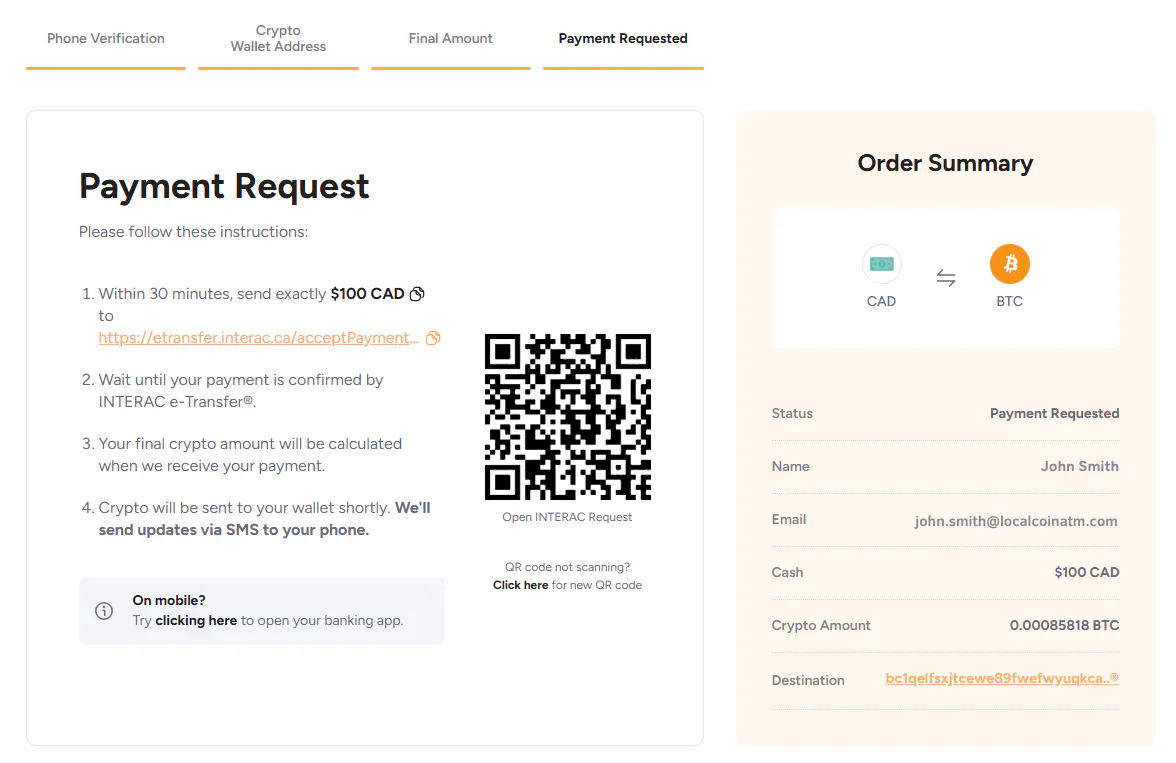
Step 4: Send Your INTERAC e-Transfer®
You'll arrive at the Payment Request page. Within 30 minutes, send exactly the CAD amount shown to the INTERAC e-Transfer request provided:
- On a computer: open the INTERAC request link, or scan the on-screen QR code with your phone, and send the e-Transfer from your online banking.
- On your phone: tap the on-screen link to open your banking app.
Send the exact amount shown. Once your payment is confirmed, your final crypto amount is calculated and your Bitcoin is sent to your wallet shortly. You'll receive SMS updates along the way.
How long does it take? Most purchases are completed within minutes. Delivery can take up to 30 minutes depending on payment confirmation times and crypto network traffic.
What Are the Fees & Exchange Rate?
Localcoin charges a flat 4% fee on each online purchase. The fee — and the exact amount of Bitcoin you'll receive — is displayed on screen before you send your INTERAC e-Transfer, so there are no surprises.
Your final crypto amount is based on the exchange rate at the moment Localcoin receives your INTERAC e-Transfer, so the estimate shown before you pay may change slightly with the market.
Save on fees: Enter code EBUY to take 20% off your fee — bringing your 4% fee down to 3.2%.
Tip: Review the amount shown before sending — it reflects the current rate and any discount you've applied.
Is Buying Bitcoin Online With INTERAC e-Transfer Safe?
Yes — buying through a regulated, trusted operator like Localcoin is safe. Localcoin is a registered Money Services Business (MSB) in Canada and complies with FINTRAC anti-money laundering regulations.
Security built into every online purchase:
- SMS phone verification on every purchase
- INTERAC e-Transfer — the same secure method Canadians use for everyday banking
- Direct-to-wallet transfers — your crypto goes straight to your own wallet, not through a third party. Localcoin does not store your crypto.
- Blockchain transaction records that are permanent and tamper-proof
Important: Only send your INTERAC e-Transfer to the request shown in your Localcoin checkout. Localcoin will never ask you to send an e-Transfer or Bitcoin to a stranger's wallet or to anyone outside the official on-screen request. If you're ever unsure, contact Localcoin support before sending.
Frequently Asked Questions
Ready to Buy Bitcoin Online?
Buying Bitcoin online has never been simpler. With Localcoin and INTERAC e-Transfer, you can go from your banking app to Bitcoin in your wallet in minutes — no exchange account, no wait times, no complicated process. Enter code EBUY at checkout to save 20% on your fee.